
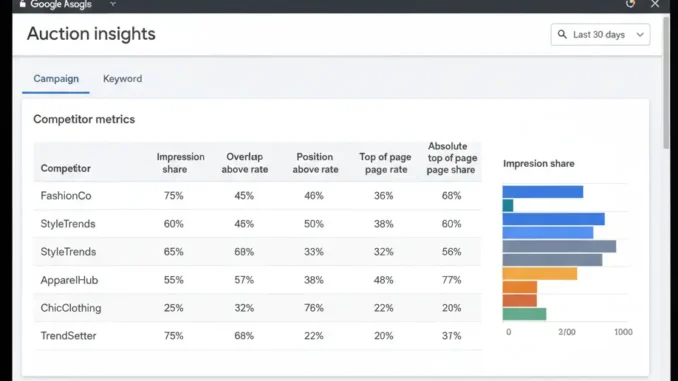
In the fast-paced ecosystem of Pay-Per-Click (PPC) advertising, managing your campaigns without knowing what your competitors are doing is like playing chess with a blindfold on. Every time a user enters a query on Google, a real-time auction occurs. Understanding how your ads perform relative to other advertisers competing for the same audience is the difference between an average campaign and an industry-leading PPC engine.
Enter the Google Ads Auction Insights Report. This built-in analytical feature provides direct, transparent visibility into competitor behavior. By analyzing metrics like Impression Share, Overlap Rate, and Outranking Share, digital marketers can uncover actionable strategic opportunities, adjust bidding strategies, optimize ad delivery, and protect brand market share.
Key Insight: Auction Insights isn’t just about tracking competitors; it’s a diagnostic tool that reveals whether lost visibility is caused by insufficient budget, poor Ad Rank, or aggressive competitor bidding.
1. What Is the Google Ads Auction Insights Report?
The Auction Insights report is an advanced competitive intelligence feature available within Google Ads. It allows you to compare your campaign performance with other advertisers participating in the exact same auctions. Rather than offering vague market estimates, Google pulls directly from auction-level log data to give you concrete comparative metrics.
Auction Insights data is available at three distinct organizational levels within your account:
- Campaign Level: Evaluates overall performance across high-level business initiatives or product categories.
- Ad Group Level: Isolates competition for specific sub-categories or tightly themed ad groups.
- Keyword Level: Drills down into individual high-value keywords to identify exact search query battlegrounds.
Note: Auction Insights is available for both Search and Performance Max (P-Max) campaigns, providing holistic cross-channel visibility.
2. Understanding the 6 Core Auction Insights Metrics
To leverage Auction Insights effectively, you must understand what each metric represents and how they interact with one another. The report consists of six fundamental metrics:
| Metric Name | Definition | Strategic Business Takeaway |
|---|---|---|
| Impression Share (IS) | The percentage of impressions your ads received out of the total eligible impressions. | Shows market dominance. Low IS indicates growth potential via budget or Quality Score fixes. |
| Overlap Rate | How often another advertiser’s ad received an impression when your ad also received an impression. | Identifies your primary, direct competitors bidding on the same search intent. |
| Outranking Share | How often your ad ranked higher in the auction than a competitor’s ad, or showed when theirs didn’t. | Measures head-to-head performance strength against specific domain rivals. |
| Position Above Rate | How often a competitor’s ad appeared in a higher position than yours when both ads appeared together. | High rate indicates competitor has higher Ad Rank (bids or Quality Score). |
| Top of Page Rate | How often your ad (or a competitor’s) appeared at the top of the page, above organic results. | Indicates overall premium placement frequency in search engine results pages (SERPs). |
| Abs. Top of Page Rate | How often your ad appeared as the very first ad at the top of the search results page. | Measures supreme brand placement and maximum click-through potential. |
3. Step-by-Step: How to Access Auction Insights in Google Ads
Navigating to the Auction Insights dashboard is straightforward. Follow these steps depending on what level of detail you want to analyze:
- Sign in to your Google Ads account.
- From the left-hand navigation menu, click on Campaigns, Ad Groups, or Search Keywords.
- Select the specific campaigns or keywords you wish to analyze by checking their boxes.
- Click on the Auction Insights tab located at the top of the data table.
- To view segmentations over time, click Segment and choose options like Time (Day, Week, Month) or Device (Mobile, Desktop, Tablet).
4. Advanced Strategies to Boost Campaigns Using Auction Insights
Simply looking at numbers won’t improve your ROI. The real value lies in converting these metrics into tactical campaign adjustments. Here is how expert PPC managers utilize Auction Insights data:
Strategy 1: Identify and Protect Brand Key Terms
If you notice competitor domains appearing in your brand keyword campaigns with high Overlap Rates, competitors are actively poaching your high-intent traffic. Use this data to raise your Target Impression Share bidding strategy on brand terms to 90%+ Absolute Top of Page, defending your turf against aggressive rivals.
Strategy 2: Diagnose Quality Score vs. Budget Limitations
Cross-reference Auction Insights metrics with your Search Lost IS (Budget) and Search Lost IS (Rank) columns:
- If Lost IS (Budget) is high: Your ad rank is fine, but your daily budget limits reach. Increase daily budgets on high-converting campaigns.
- If Lost IS (Rank) is high: Increasing bids alone is insufficient. You need to improve Ad Relevance, Expected CTR, and Landing Page Experience to boost Quality Score.
Strategy 3: Uncover New Industry Competitors Early
Segment your Auction Insights reports by month. A sudden dip in impression share coupled with the emergence of a new domain name indicates a fresh player entering your niche. Spotting new competitors early gives you time to refine ad copy, emphasize unique value propositions (USPs), or offer competitive promotions before losing market share.
Strategy 4: Optimize Bidding Strategies by Device
Segment the report by Device. If a competitor has a commanding 80% impression share on Mobile but only 20% on Desktop, they are likely over-bidding on mobile devices. You can respond by capitalizing on Desktop auctions with lower CPCs or optimizing your mobile landing pages to compete head-on.
Pro Tip: Combine Auction Insights with Ad Transparency Tools
When you spot a competitor with a high Position Above Rate, search their domain in the Google Ads Transparency Center. You can view their active creative formats, headlines, offer hooks, and extensions, allowing you to craft ad copy that directly counters their positioning.
5. Common Pitfalls to Avoid When Analyzing Auction Insights
While Auction Insights is a powerful tool, misinterpreting the data can lead to wasteful ad spend. Watch out for these common mistakes:
- Chasing 100% Impression Share Blindly: Achieving 100% impression share often leads to diminishing returns and inflated CPCs. Always balance visibility goals with your Target CPA or Target ROAS limits.
- Assuming Low Overlap Means Low Competition: A competitor with a 15% overlap rate might still have a higher conversion rate or better product offerings. Look at holistic account performance rather than reacting to single metrics.
- Ignoring Date Ranges: Comparing seasonal months (e.g., Q4 Black Friday) to standard months distorts competitor bidding behavior. Always compare equivalent historical date ranges.
Frequently Asked Questions (FAQs)
Google’s privacy and competitive policies protect exact account details. Auction Insights shows domain-level performance and competitive metrics for shared auctions, but it will never reveal a competitor’s exact targeting list, CPC bids, or quality scores.
Auction Insights data is updated regularly, usually with a lag of 4 to 24 hours depending on the account volume. It is not instantaneous real-time tracking, but it is accurate enough for daily or weekly strategic adjustments.
Auction Insights requires a minimum threshold of activity to generate report data. If your selected campaign, ad group, or keyword received very few impressions during the selected date range, Google will display a blank report to preserve privacy standards.
Final Thoughts: Turning Intelligence into Market Leadership
Mastering Google Ads requires more than internal keyword optimization—it demands continuous market awareness. The Auction Insights report provides the clarity needed to navigate competitive PPC landscapes confidently.
By regularly auditing your Impression Share, tracking competitor shifts, and aligning bid adjustments with strategic business goals, you can optimize ad spend, defend your market presence, and consistently outperform industry rivals.




Leave a Reply